
Cloud computing is now the foundation of digital transformation. Still, how to choose between Public vs Private vs Hybrid Cloud can be confusing. Hence, this guide explains each deployment model, compares them side‑by‑side, and helps you decide which one fits your needs.
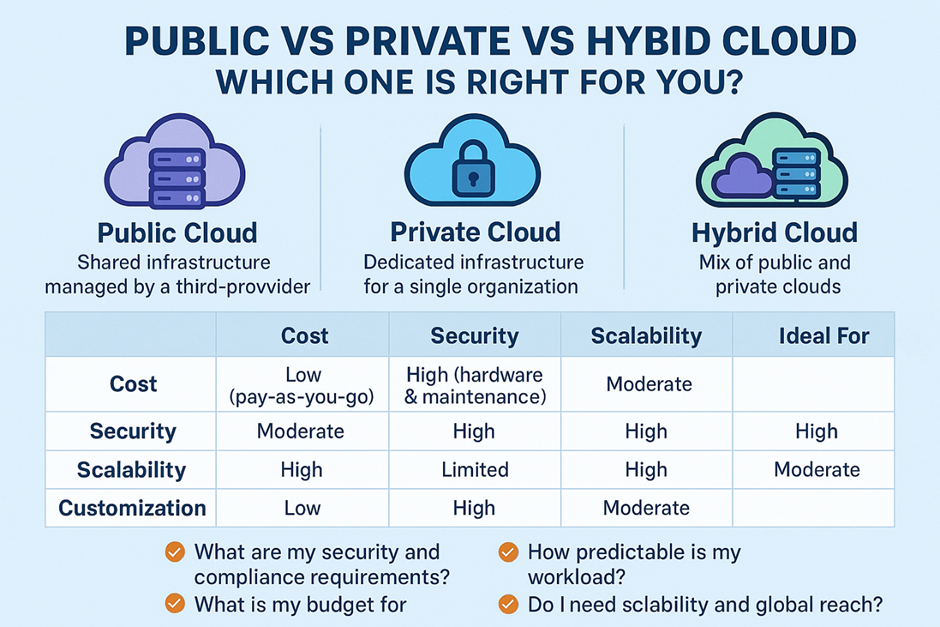
What Are Cloud Deployment Models?
- Public Cloud: Shared infrastructure operated by a third‑party provider (e.g., Microsoft Azure, AWS, Google Cloud). You rent resources and pay for what you use.
- Private Cloud: Dedicated infrastructure for a single organization, hosted on‑premises or by a managed provider (e.g. Antyxsoft Cloud). You get maximum control and customization.
- Hybrid Cloud: A mix of public and private clouds with portability of data/apps and unified management where possible.
1) Public Cloud
Best for: Rapid experiments, spiky traffic, global reach without capital expense.
Pros
- Cost efficiency: No hardware purchase; pay‑as‑you‑go and reserved/spot options reduce cost.
- Elasticity: Scale up/down instantly for seasonal or unpredictable demand.
- Speed to value: Provision services in minutes; broad managed services portfolio.
Cons
- Shared responsibility: Provider secures the cloud; you secure what you deploy. Security is one of the main concerns associated with public cloud and has been highlighted by users and researchers alike (Srinivasan et al., 2020)
- Data residency & compliance challenges if regulations require strict locality or controls.
- Egress costs for moving large data out.
Common use cases
- Digital products with variable traffic (e‑commerce, media).
- Dev/Test and CI/CD pipelines.
- Analytics and AI workloads that benefit from on‑demand GPUs.
2) Private Cloud
Best for: Highly regulated data, consistent performance, and custom controls.
Pros
- Security & compliance control: Tailor network segmentation, HSMs, logging, and retention.
- Predictable performance: Dedicated resources; consistent latency.
- Customization: Fine‑tuned stacks (e.g., bespoke hypervisors, storage tiers).
Cons
- Higher TCO: CapEx for hardware, datacenter space, and staff.
- Scaling lead time: Procurement and capacity planning slow agility.
- Innovation pace: Fewer turnkey managed services than public cloud.
Common use cases
- Financial services core systems, healthcare EMR data, public sector workloads.
- IP‑sensitive R&D environments.
- Legacy systems tightly coupled to specific hardware.
3) Hybrid Cloud
Best for: Keeping sensitive data on private infrastructure while using public cloud for scale or specialized services.
Pros
- Flexibility: Place each workload where it fits best (policy, cost, latency).
- Bursting: Handle peak events by bursting from private to public.
- Resilience & DR: Replicate to another environment; failover options.
Cons
- Operational complexity: Identity, policy, networking, and observability must be unified.
- Data gravity: Moving large datasets between environments can be slow/expensive.
- Consistency: Achieving uniform security posture and IaC across estates requires discipline.
Common use cases
- Data stays private; analytics/ML run in public.
- Edge + central processing: process locally, aggregate in cloud.
- M&A or phased migrations where not everything moves at once.
Public vs Private vs Hybrid Cloud: To choose more easily, check the comparison table below:
| Capability | Public Cloud | Private Cloud | Hybrid Cloud |
| Cost model | OpEx, pay‑as‑you‑go; discounts (reserved/spot) | Higher fixed CapEx + OpEx staffing | Mix of OpEx + CapEx; optimize per workload |
| Scalability | Virtually unlimited | Limited to installed capacity | High (public) + reserved (private) |
| Security posture | Strong provider controls + your configs | Full control; bespoke controls | Strong but complex—needs unified policies |
| Compliance | Many certifications; data residency varies | Full sovereignty possible | Balance controls with agility |
| Customization | Standardized services | High—tuned to org needs | Moderate—abstraction layers help |
| Time to deploy | Minutes | Weeks–months | Varies by integration |
| Best for | Startups, SaaS, bursty workloads | Regulated/latency‑sensitive workloads | Enterprises with mixed needs |
A Simple Decision Path
- Strict sovereignty or air‑gapped data? → Start Private, integrate to Hybrid later.
- Highly variable demand and speed to market? → Public (with IaC + cost guardrails).
- Mix of regulated + bursty workloads? → Hybrid with unified identity, policy, and observability.
- Data gravity (10s of TB+ that must stay on‑prem)? → Private/Edge first, extend selectively.
- Greenfield SaaS? → Public for speed and managed services.
Cost & Operations Considerations (TCO lens)
- Compute & storage: Public cloud OpEx vs. private hardware amortization.
- Networking: Watch egress/peering fees in public and interconnect for hybrid.
- People & process: Private requires platform ops; hybrid needs tooling for identity, policy-as-code, IaC, monitoring, and FinOps.
- Risk: Evaluate compliance penalties vs. agility benefits.
- Exit strategy: Prefer portable architectures (containers, Kubernetes, open data formats).
Practical Stack Patterns
- Public-first: Managed databases, serverless, object storage, CDN; IaC (Bicep/Terraform), centralized IAM, and budget alerts.
- Private-first: Virtualization platform + software‑defined storage + zero‑trust networking; automate with GitOps.
- Hybrid: Kubernetes spanning on‑prem and cloud; consistent secrets management; shared CI/CD; log/metric federation.
FAQ
Q1. Public vs Private vs Hybrid cloud: What is the main difference?
Public uses shared provider infrastructure, private is dedicated to one organization, hybrid combines both with portability and unified management.
Q2. Is hybrid cloud the same as multi‑cloud?
No. Hybrid mixes private + public, whereas Multi‑cloud uses more than one public provider. You can be both hybrid and multi‑cloud.
Q3. Which model is most cost‑effective?
For variable workloads, public cloud with right‑sizing and reserved pricing is usually cheapest. On the other hand, for steady, predictable loads at scale, private may be competitive if fully utilized.
Q4. Which is best for compliance?
Although, public cloud offer many certifications, private cloud gives maximum control. As a result, the right answer depends on your specific regulatory and data residency needs.
Q5. Can I migrate gradually?
Yes—start with non‑critical workloads in public cloud, keep sensitive systems private, and evolve to hybrid with unified identity, networking, and observability.
Q6. What are the biggest hybrid pitfalls?
Inconsistent security policies, hidden data egress costs, and fragmented monitoring. Use IaC, policy‑as‑code, and central logging/metrics to avoid them.
Q7. How do I avoid vendor lock‑in?
Use containers, Kubernetes, open data formats, and IaC frameworks. Favor services with portable APIs or plan abstractions carefully.
To conclude, if you are still unsure how to choose between Public vs Private vs Hybrid Cloud, you should ask yourself:
- What are my security and compliance requirements?
- How predictable is my workload?
- What is my budget for IT infrastructure?
- Do I need scalability and global reach?